






Your cart is empty
Looks like the spiders padded through here. Pick a plugin and it will show up here. Continue shoppingThe type is set per currency with Type in Editor > Currencies > <currency>, the other options on this page open with Right-Click on Type, all saved to the currency's own file in the currencies folder.
| Type | Balance |
|---|---|
| Balance | Kept in the database. The default. |
| Physical item | Kept in the database too, and filled by depositing items. Withdrawing turns it back into items. |
| Experience | Kept in the database too, and filled by depositing experience, see Experience Currencies. |
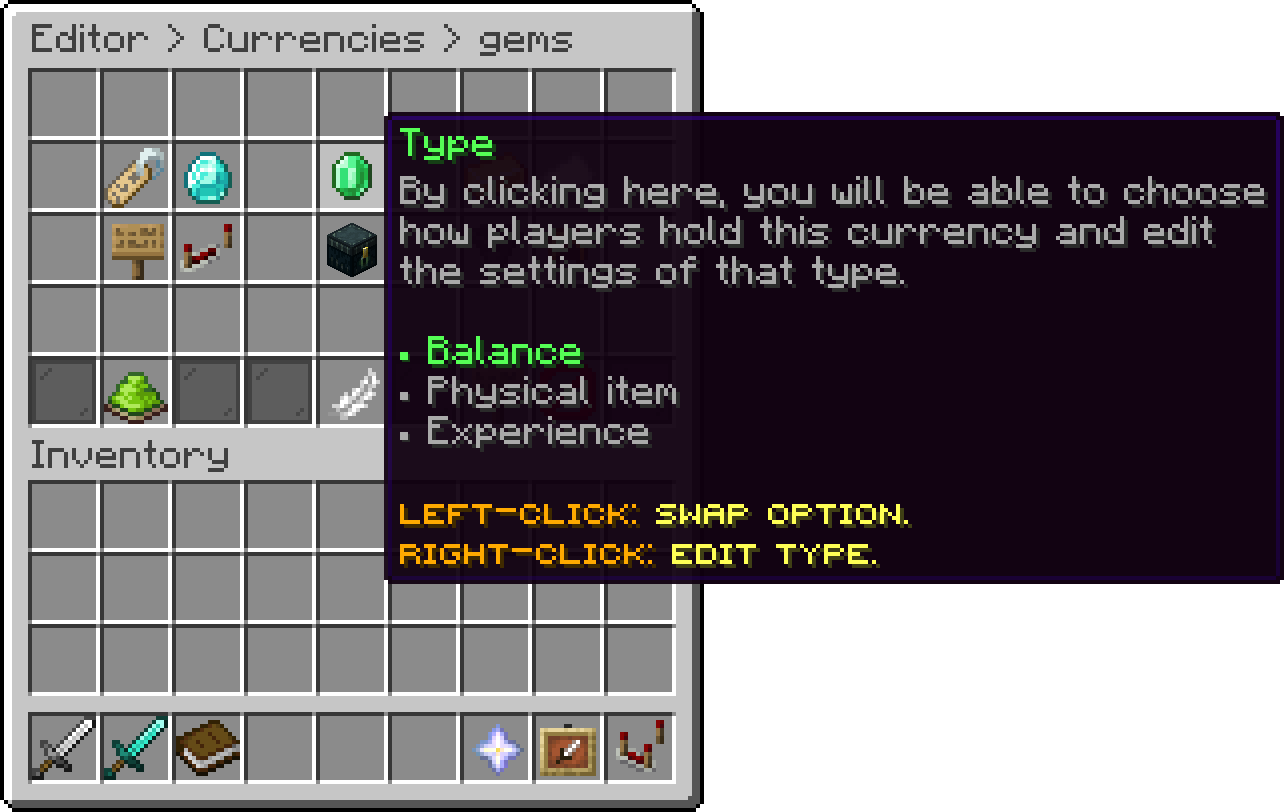
gems (Type)
A Physical item currency works like any other balance once the items are in: payments, offline players, leaderboards and worlds all apply. Amounts are always whole numbers: the currency uses no decimals, and every setting that takes an amount refuses one with decimals. Only the items the player deposits, or the ones they withdraw, are actual items.
/<currency> deposit puts every matching item from the inventory and the off hand into the balance. /<currency> deposit <amount> only puts in items worth exactly that amount, and refuses when the items don't add up to it. Players can also click a matching item they hold, see Deposit Click below, or Left-Click the currency in the wallet.
A deposit that would go past the maximum balance is refused and the items stay in the inventory. The items are taken and the player's data is saved before the balance is added, so a crash can never leave a player with both.
/<currency> withdraw <amount> takes the amount from the balance and hands it out as items. It is refused when no item is set or the items don't fit in the inventory. Players can also press Q on the currency in the wallet. The balance is taken and saved before the items are given; if the player leaves or the inventory fills up in between, the amount goes back to the balance.
Item currencies have no banknotes: withdrawing gives the items instead. In a bank, an item currency holds and pays out real items too.
The item that counts as the currency, each one worth 1. Drag the item from your inventory onto Item on the Type screen to set it. An item only counts when it matches exactly, name and lore included.
Which click on a held matching item deposits that stack: Off (the default), Right-Click or Shift + Right-Click. Pick Shift + Right-Click when the item is a block players should still be able to place, such as an emerald block.
Your guide to the docs
Ask me anything about our plugins. I know these docs inside out, check the latest versions and changelogs, and can read your server logs.
Try asking
Your cart is empty
Looks like the spiders padded through here. Pick a plugin and it will show up here. Continue shopping