










Your cart is empty
Looks like the spiders padded through here. Pick a plugin and it will show up here. Continue shoppingThis is the installation guide for the Christmas Crate Animations Add-on
This is an addon for PhoenixCrates, not a plugin.
To install the Christmas Crate animations, make sure to drag and drop the JAR file into the PhoenixCrates/addons folder. Be sure to install it there; otherwise, the file won't work.
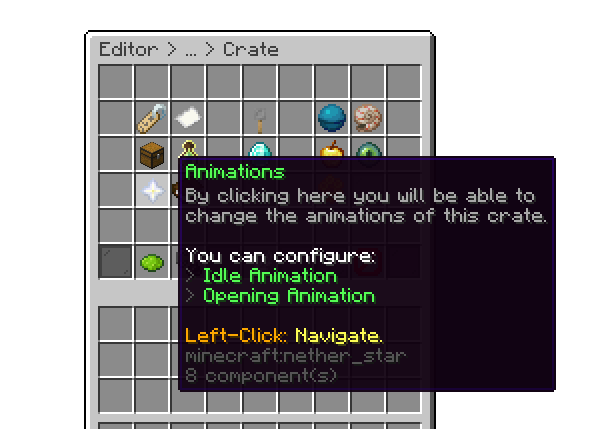
Once you have installed the JAR successfully, head over to the editor and then to the animations. From there, you will be able to configure the animations for each crate.
Every Christmas animation can be customized per crate. In the crate's opening animations, right-click the selected animation to open its settings. Depending on the animation you can change the items and head textures it uses, Santa's and the elf's outfit, sizes, colors, the melody and how many presents, ornaments or snowflakes it spawns. Reset to Defaults restores every setting of that animation.
Just like the plugin's built-in animations, each Christmas animation registers as an independent Pre Open (Phase 1), Post Open (Phase 2), or Reward Display (Phase 3) animation, so you can freely mix and match any phase 1 with any phase 2 and phase 3, not only the suggested combinations below. The following list shows the combinations they were designed around:
Phase 1: Christmas Santa Claus
Phase 2: Christmas Present Cannon
Phase 3: Christmas Merry Cyclone
Phase 1: Christmas Bouncing Present
Phase 2: Christmas Magic Elf
Phase 3: Christmas Snowfall
Phase 1: Christmas Tree
Phase 2: Christmas Flying Ornaments
Phase 3: Christmas Essence
Your guide to the docs
Ask me anything about Phoenix Crates. I know these docs inside out, check the latest versions and changelogs, and can read your server logs.
Try asking
Your cart is empty
Looks like the spiders padded through here. Pick a plugin and it will show up here. Continue shopping