

Oops... looks like the spiders padded through here
Add products to your cart and remove them from here Lets buy




On this page, you will find everything you need to know about the logger.
The logger records two things: when a player opens a crate, and when a player receives a reward. Both are written to a log file on your server, and can also be sent to a Discord channel through a webhook.
Everything on this page is configured in logger.yml.
Logging to file is always on and needs no setup. The current log is plugins/PhoenixCrates/logs/latest.log, with one timestamped line per action:
[2025-08-24_19-42-07][INFO] Steve opened a crate Vote Crate (vote) at world, 128, 64, -310.
Every time the server starts, the previous latest.log is compressed and kept alongside it as <date>_<time>.log.gz, so history is never overwritten. Old archives are kept until you delete them.
To also send these to Discord, set discord-webhook.enabled to true in logger.yml. By default this is set to false.
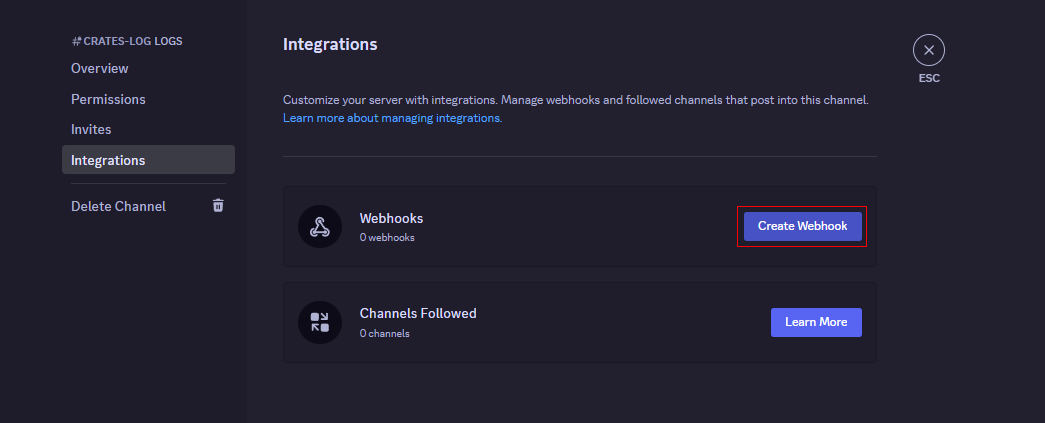
First, go to the settings of the Discord channel where you want to log crate actions. Then, navigate to the Integrations tab and click Create Webhook.
The webhook will now have a URL. Make sure to click the copy button to save it.
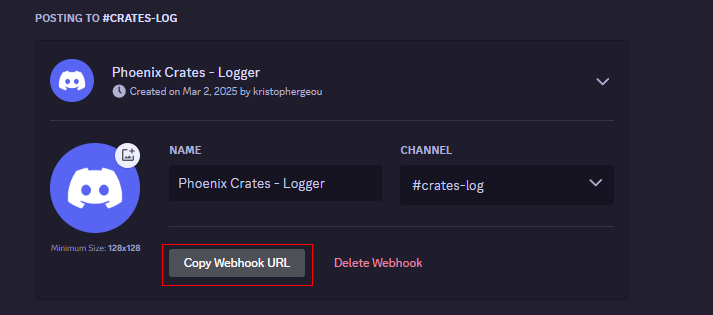
After copying the link, paste it into the url: '' field in the discord-webhook settings.
Now that the logger is set up, you can customize it by modifying the messages and the embed sent to the channel.
.png)
The two log-format entries decide what each line says. The same text is used for the file and for Discord.
log-format:
  open-crate: '%player% opened a crate %crate_name% (%crate_id%) at %location%.'
  won-reward: '%player% got the reward %reward_name% (%reward_id%) on crate %crate_name% (%crate_id%).'
| Placeholder | Available in | Description |
|---|---|---|
| %player% | both | The player's name. |
| %crate_name% | both | The crate's display name, without colours. |
| %crate_id% | both | The crate's identifier. |
| %location% | open-crate | The crate's position, as world, x, y, z. |
| %reward_name% | won-reward | The reward's display name, without colours. |
| %reward_id% | won-reward | The reward's identifier. |
| %reward_amount% | won-reward | The amount on the reward's display item. |
Setting a format to '' (empty quotes) switches that action off completely. It stops being written to the file and stops being sent to Discord. This is the way to log only rewards, or only openings.
The name and avatar the webhook posts under, and the embed it posts, are all configurable.
discord-webhook:
  enabled: true
  url: ''
  avatar-url: ''
  username: Phoenix Crates - Logger
  embed:
    title: Action Log
    description: '%message%'
    color: '#4a20ff'
| Option | Description |
|---|---|
| url | The webhook URL you copied from Discord. |
| username | The name the message is posted under. |
| avatar-url | A direct image URL to use as the avatar. Leave empty for the webhook's own. |
| embed.title | The embed's heading. |
| embed.description | The embed's body. %message% is the formatted log line. |
| embed.color | The stripe colour down the side of the embed, as a hex value. |
Now, make sure to save the changes and restart the plugin to apply the changes.
Oops... looks like the spiders padded through here
Add products to your cart and remove them from here Lets buy