

Oops... looks like the spiders padded through here
Add products to your cart and remove them from here Lets buy



On this page, you will find all the commands that you can use on our plugin
Below, you will find information on various commands available, their functionalities, and how to use them effectively.
Command alias: /phoenixlobby, /plobby
| Command | Description |
|---|---|
/plobby spawn |
Teleport to spawn location |
/plobby setspawn |
Set spawn location |
/plobby createNpc <identifier> |
Create npc type |
/plobby deleteNpc <identifier> |
Delete npc type |
/plobby bypass |
Bypass world rules |
/plobby holograms movehere <identifier> |
Move a hologram to where you stand |
/plobby holograms teleportto <identifier> |
Teleport yourself to a hologram |
/plobby setup <template> |
Allows you to setup a template of npcs |
/plobby editor |
Allows you to edit the plugin in-game |
/plobby reload |
Reload all PhoenixLobby configuration files |
/maintenance |
Close this server for maintenance |
/alts |
Manage the accounts sharing an address |
| Command | Description |
|---|---|
/spawn |
Teleport to spawn location |
/lobbies |
Open the lobby selector |
/servers |
Open the server selector |
/visibility |
Show or hide the other players |
/visibility <on/off> |
Set the state instead of toggling it |
/music |
Open the music menu |
/parkour |
Start a parkour run |
/parkour <id> |
Start that parkour in particular |
/parkour stop |
Leave the run |
/parkour top [id] |
Show the parkour leaderboard |
/playersettings |
Open the player settings menu |
/toggleactionbar |
Turn the action bar on or off |
/togglebossbar |
Turn the bossbar on or off |
/togglescoreboard |
Turn the scoreboard on or off |
/toggleannouncements |
Turn the chat announcements on or off |
| Command | Description |
|---|---|
/queue <server> |
Join the queue for a specific server |
/server <server> |
Join the queue for a specific server (requires setup) |
/leavequeue |
Leave current queue |
/lobby or /hub
|
Return back to the lobby |
/lobbies (lobby command) |
Swap between lobbies |
/<shortcut> |
Connect straight to a server (requires setup) |
/maintenance |
Close a server or the network for maintenance |
/alts |
Manage the accounts sharing an address |
A few of the player commands accept more than one word for the same thing, so an action or a menu item can be written whichever way reads best.
| Command | Also accepts |
|---|---|
/parkour start |
play, join
|
/parkour stop |
leave, quit
|
/parkour top |
leaderboard |
/parkour <id> and /parkour start <id> do the same thing, and both are handy on an NPC or a hotbar item that should drop the player straight into one parkour.
/plobby setup builds a set of NPCs for you rather than making you place them one by one. One template exists:
| Template | Creates |
|---|---|
npcpackv1 |
The five NPCs of the NPC Model Pack, using Model Engine |
/plobby setup npcpackv1
It needs Model Engine installed with the pack's models already loaded, and it stops without changing anything if an NPC of the same name already exists.
Every command apart from the root one can be switched off, and renamed to whatever suits your server. Both live on the same option, in Editor > Settings > Commands.
Turning a command off unregisters it entirely, so it stops appearing in tab completion as well. Renaming it changes the name it is registered under, so setting the alternative of /spawn to hub means players type /hub and /spawn no longer exists.
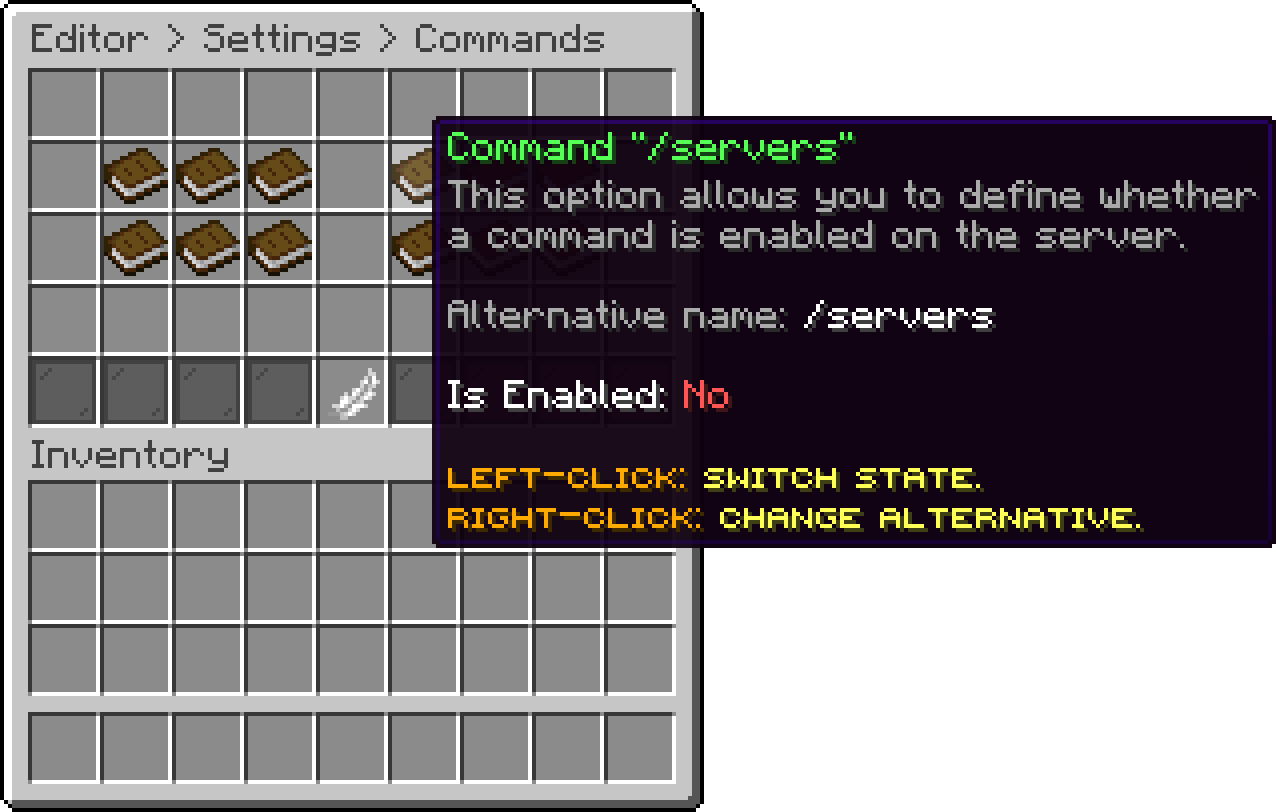
Commands (Command "/servers")
Renaming a command is the way to hand it over to another plugin. See How to make Essentials overwrite /spawn for that case.
Oops... looks like the spiders padded through here
Add products to your cart and remove them from here Lets buy