









Your cart is empty
Looks like the spiders padded through here. Pick a plugin and it will show up here. Continue shoppingThe first step is to install PhoenixLobby on both your proxy server and your lobby servers.
If you have set up your servers correctly and installed Phoenix Lobby on your proxy and lobby, the lobby server should automatically appear in the config.yml of the plugin on your proxy server. If it's not there, make sure to set it manually.
servers:
    lobby: {display-name: Lobby, maximum-slots: 100}
registered-lobbies: [lobby]
Turn on Register Lobby In Proxy from Editor > Settings on the lobby server, so it announces itself to the proxy on startup instead of you adding it by hand.
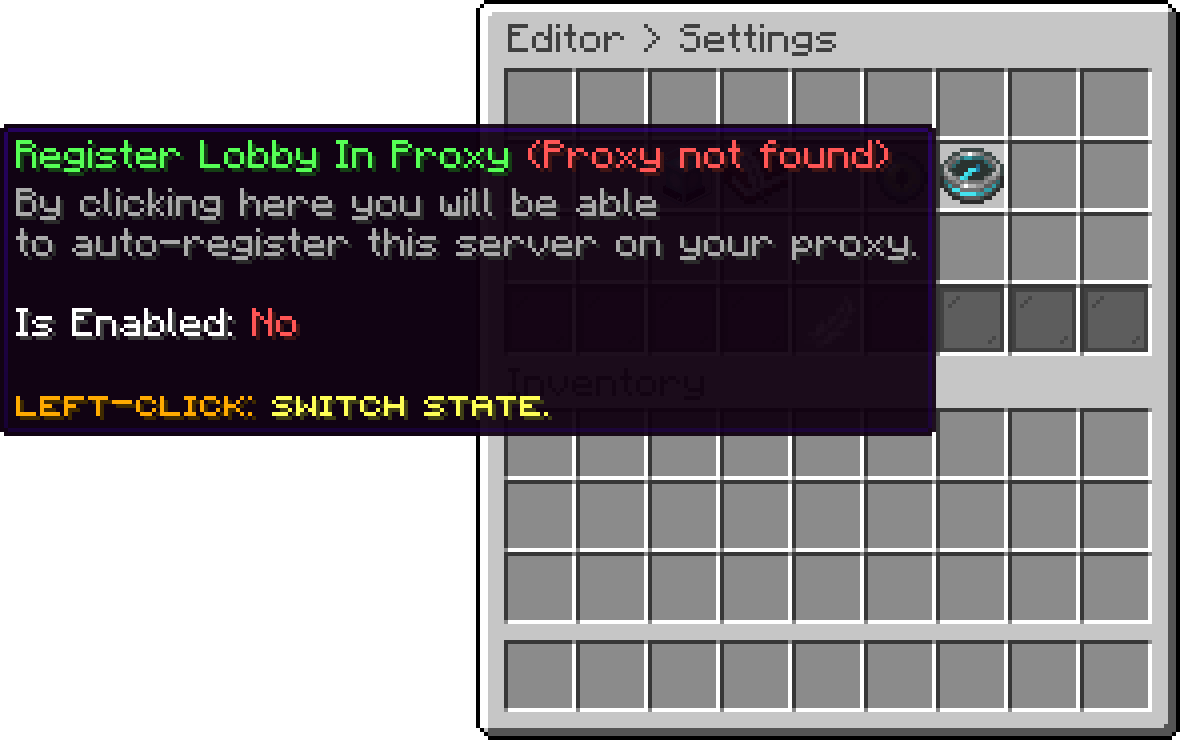
Settings (Register Lobby In Proxy)
The option names the proxy it found in its title. Proxy not found means this server is not talking to one yet, so finish steps 1 and 2 first.
The same switch is register-lobby in the lobby server's config.yml if you would rather set it there.
The proxy's registered-lobbies list decides which servers are lobbies. Turning this option off does not remove a server that is already on it. To unregister a lobby, take it out of registered-lobbies on the proxy and restart the proxy.
Every feature from Multiple Lobbies down needs the plugin installed on the proxy as well, and so do the network Placeholders.
Some features exist on both sides. As soon as the lobby is talking to a proxy, the proxy is the one in charge: the lobby module stands down and whatever is set on the lobby is ignored, so these have to be configured on BungeeCord or Velocity.
| Feature | Why the proxy wins |
|---|---|
| Alt Protection | The proxy sees every server at once, so accounts spread over two of them are still counted as one address. A lobby only ever sees its own players. |
| Join & Quit Messages | The proxy announces a player once for the whole network, through Join and Leave Messages, instead of once per backend. |
| Maintenance | The proxy denies the connection before it reaches a backend, and can close one server or the whole network. |
| MOTD | The ping never reaches a backend server, so the motd players see is always the one from the proxy. |
The lobby commands for those features answer that the proxy is in charge instead of doing nothing quietly.
Make sure your database is properly set up in the config.yml if you want to use multiple lobbies. If they aren’t connected to the same database, you may run into issues.
Sets how many seconds a server may take to be discovered and become available.
server-discovery-seconds: 3
3 seconds is the recommended amount. Lowering it makes a server available faster but can cause performance issues.
In addition to the queue system, PhoenixLobby offers convenient options for NPC actions. Administrators can use the following actions to connect players directly to specific Proxy servers:
[COMMAND] player;queue your_server - Triggers the queue system and adds the player to the waiting line before connecting them to the specified server.[PROXY] your_server - Directly connects the player to the specified Proxy server without involving the queue system.The messages.yml of the proxy is not updated on its own. If a message shows up as Invalid Message after an update, delete the file to get the new one, or copy the missing part into yours.
Make sure your backend servers are connected to the proxy. If they aren’t, PhoenixLobby won’t detect them. If you're using Velocity or BungeeCord, check their documentation for proper setup. We encourage our users to install Velocity instead of Bungeecord.
Velocity Docs - Click Here
Bungeecord Docs - Click Here
With Proxy, you can set up and manage multiple lobbies, each with its own settings, themes, and features.
All of the lobbies have to point at the same database, otherwise you may run into issues.
PhoenixLobby can send players to lobbies with fewer players, keeping the server balanced.
A player who joins through one of your proxy's forced hosts goes straight to that host's server instead of being sent to a lobby. A forced host that points at a lobby is still balanced across all of your lobbies.
[forced-hosts]
"opencreative.yourserver.com" = ["opencreative"]
"play.yourserver.com" = ["lobby"]
With this in velocity.toml, joining through opencreative.yourserver.com lands on opencreative, while play.yourserver.com goes to whichever lobby has the fewest players. On BungeeCord the same mapping is forced_hosts in its config.yml.
A forced server under maintenance still sends a player who is not allowed in to a lobby.
Players can move between lobbies easily, making the experience smooth across the network.
Registers a new server as a lobby on its own when its name matches your pattern. This is meant for lobbies that are created automatically, so they join the lobby selector without you adding them by hand.
lobby-auto-registration:
    enabled: false
    pattern: '^lobby-[a-z0-9]{5}-[a-z0-9]{5}$'
Helps manage high player traffic by placing players in a waiting line, preventing server overload.
queue:
    enabled: true
    forward-time: 5
    reminder-time: 5
    disable-between-lobbies: true
forward-time is how long it takes to dispatch a player from the queue, and reminder-time is how often the position message is sent.
queue:
    reminder-display: both
    persistent-actionbar: true
reminder-display is where the position reminder shows: chat, actionbar or both. With persistent-actionbar on, the action bar is refreshed every second instead of only every reminder-time, so it does not fade away between reminders.
Gives your ranks a better place in the queue. A player holding phoenixlobby.queuepriority.<number> is placed above everyone queued with a lower number, and players sharing the same number keep the order they joined in. Players without the permission count as 0.
queue:
    priority:
        enabled: true
        max-priority: 100
max-priority is the highest number that is looked up when a player joins a queue, so lower it if you only hand out small priority numbers.
With per-server on, phoenixlobby.queuepriority.<server>.<number> gives that priority for one server only, and is checked before the general permission. The server name is lowercase.
Keeps free slots on a server for your higher ranks, so a full server still lets a rank in while everyone else waits.
queue:
    slot-limits:
        enabled: true
        servers:
            survival:
                default: 90%
                vip: 95%
                mvp: max
Each rank is the number of players the server may hold before that rank has to wait: a number, a percentage of the server's maximum-slots, or max for every slot. A player holding phoenixlobby.queueslots.<server>.<rank> gets that rank's limit, for example phoenixlobby.queueslots.survival.vip. A rank named default applies to everyone. A player holding several ranks gets the highest limit, and a server without a matching rank has no limit. A player who has to wait because of a limit is told no slots are free for their rank yet. A value that is not a number, a percentage or max is skipped with a warning in the proxy console.
When every lobby is full, a joining player is normally kicked. With a waiting server they are sent there instead, join the lobby queue with their priority, and are forwarded to a lobby as soon as a slot frees up.
lobby:
    full-queue:
        enabled: true
        server: limbo
queue.enabled has to be on.server is a server of your proxy, and it must not be one of your lobbies. Use a separate lightweight server such as NanoLimbo added to the proxy. PhoenixLobby is not needed on it./leavequeue leaves the lobby queue but keeps the player on the waiting server, where they stay until they disconnect or join another server with /queue <server>. If the waiting server is offline, players are kicked as before.
The proxy console warns when it is enabled but queue.enabled is off, server is empty, server is not a server of the proxy, or server is also a registered lobby.
Registers one command per server, so /survival sends the player to the survival server instead of them having to type /queue survival. Each entry accepts extra aliases and an optional permission (leave empty for everyone). With use-queue: true the player goes through the queue system, otherwise they are connected right away.
server-shortcuts:
    enabled: true
    use-queue: true
    commands:
        survival:
            server: survival
            aliases: [smp]
            permission: ''
Command names that PhoenixLobby already uses (lobby, hub, queue, leavequeue, maintenance) are skipped, and a shortcut overrides any backend server command with the same name.
Announces on every server when a player joins or leaves the network, instead of once per backend server. Players holding the silent permission are never announced.
The lobby's own Join & Quit Messages stand down while the proxy runs PhoenixLobby, so turn this on to keep announcing joins and leaves.
join-messages:
    enabled: false
    silent-permission: phoenixlobby.silentjoin
    join:
        enabled: true
    leave:
        enabled: true
PhoenixLobby offers a kick-forward mechanism that ensures players are redirected to the lobby server after being kicked from another game server.
lobby:
    connect-on-join: true
    reconnect:
        enabled: true
        blacklisted-reasons: []
        blacklisted-servers: []
Behind a proxy the server list ping never reaches the lobby, so the message, the logo and the player count are served by PhoenixLobby on the proxy instead. There is no editor for it there, everything lives in the proxy's config.yml.
motds:
    enabled: true
    motd:
        motds:
            '0':
                - '                 &d&lYOUR NETWORK'
                - '          &8Learn more at &7&nwww.example.com'
        server-icon: 'logo'
        player-count:
            text: ''
            hover: []
            online-players: ''
            max-players: ''
            extra-players: 0
            hide-players: false
            hide-players-hover: false
        maintenance:
            enabled: true
            motd:
                - '                &c&lUNDER MAINTENANCE'
                - '              &8We will be back in &7{timer}'
            player-count-message:
                enabled: true
                enable-timer-specific-message: true
                message: '<dark_red>Maintenance'
                timer-message: '<dark_red>Come back in: <yellow>{timer}'
            player-list-hover-message:
                enabled: true
                enable-timer-specific-message: true
                message: '<red>Currently under<br><red>maintenance'
                timer-message: '<red>Come back in:<br><yellow>{timer}'
            maintenance-icon:
                enabled: false
Every option means the same as on the MOTD and Player Count pages, and the placeholders work here too. Unlike a lobby on Spigot, every player count option works on any proxy.
To use your own logo:
logo.png. The folder is created on the first start.server-icon, with or without the .png.Any size works, it is scaled to 64x64, but a square image keeps its shape. Leaving server-icon empty keeps the proxy's own icon.
A missing or unreadable file is reported once in the proxy console and then skipped until the next restart.
The proxy reads this section only on startup, so every change, including a new png, needs a restart. The icon and the player count are only sent while enabled is true. With it off, only the maintenance options are still applied. The maintenance player count, hover and icon options are explained on the Maintenance page, and maintenance-icon.png goes in the proxy's PhoenixLobby folder.
Your guide to the docs
Ask me anything about Phoenix Lobby. I know these docs inside out, check the latest versions and changelogs, and can read your server logs.
Try asking
Your cart is empty
Looks like the spiders padded through here. Pick a plugin and it will show up here. Continue shopping