

Oops... looks like the spiders padded through here
Add products to your cart and remove them from here Lets buy



Proxy Integration available to Bungeecord and Velocity
The first step is to install PhoenixLobby on both your proxy server and your lobby servers.
If you have set up your servers correctly and installed Phoenix Lobby on your proxy and lobby, the lobby server should automatically appear in the config.yml of the plugin on your proxy server. If it's not there, make sure to set it manually.
servers:
    lobby: {display-name: Lobby, maximum-slots: 100}
registered-lobbies: [lobby]
Turn on Register Lobby In Proxy from Editor > Settings on the lobby server, so it announces itself to the proxy on startup instead of you adding it by hand.
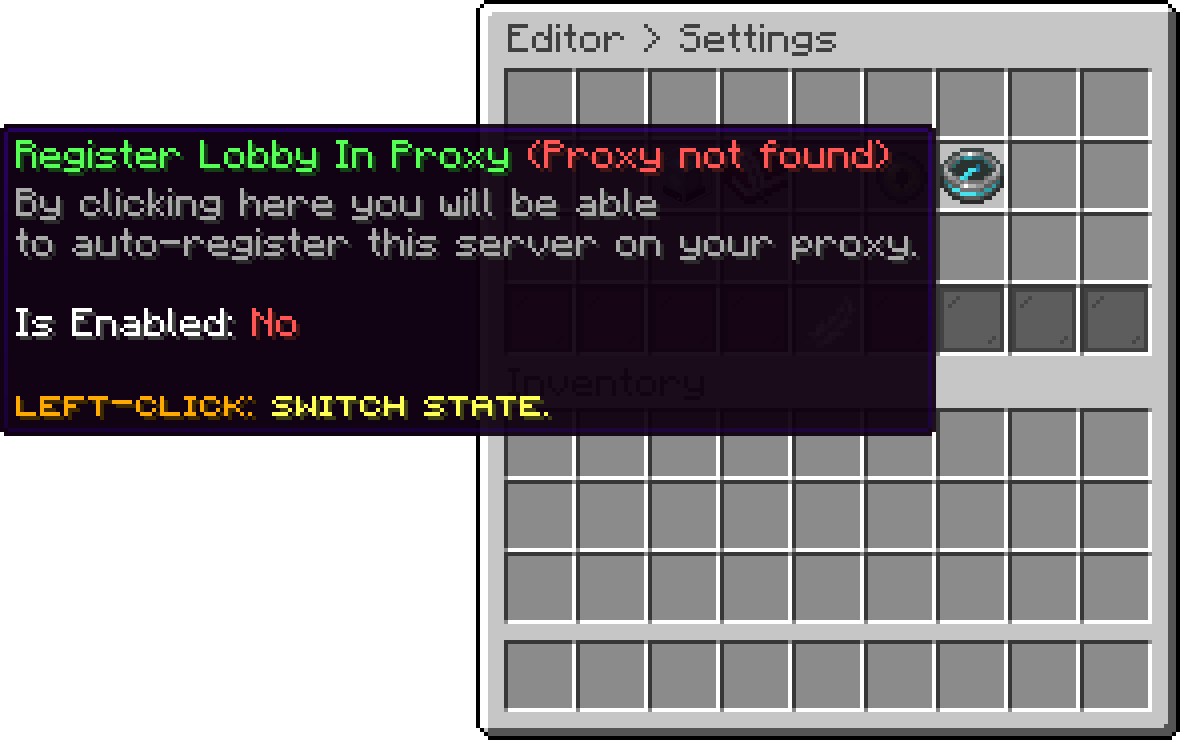
Settings (Register Lobby In Proxy)
The option names the proxy it found in its title. Proxy not found means this server is not talking to one yet, so finish steps 1 and 2 first.
The same switch is register-lobby in the lobby server's config.yml if you would rather set it there.
Each of these needs the plugin installed on the proxy as well, and has its own page:
| Feature | What it does |
|---|---|
| Multiple Lobbies | Run several lobbies, balance the users between them, and register new ones on their own. |
| Queue System | Hold the users in a waiting line, and let your ranks skip ahead. |
| Server Shortcuts | Register one command per server, such as /survival. |
| Join and Leave Messages | Announce a join or a leave once for the whole network. |
| Kick-Forward | Send the users back to a lobby after a kick from another server. |
| Placeholders | Show the player count, the MOTD and the version of any server on the network. |
One more proxy feature is covered on its own page:
Some features exist on both sides. As soon as the lobby is talking to a proxy, the proxy is the one in charge: the lobby module stands down and whatever is set on the lobby is ignored, so these have to be configured on BungeeCord or Velocity.
| Feature | Why the proxy wins |
|---|---|
| Alt Protection | The proxy sees every server at once, so accounts spread over two of them are still counted as one address. A lobby only ever sees its own players. |
| Maintenance | The proxy denies the connection before it reaches a backend, and can close one server or the whole network. |
| MOTD | The ping never reaches a backend server, so the motd players see is always the one from the proxy. |
The lobby commands for those features answer that the proxy is in charge instead of doing nothing quietly.
Make sure your database is properly set up in the config.yml if you want to use multiple lobbies. If they aren’t connected to the same database, you may run into issues.
Sets how many seconds a server may take to be discovered and become available.
server-discovery-seconds: 3
3 seconds is the recommended amount. Lowering it makes a server available faster but can cause performance issues.
In addition to the queue system, PhoenixLobby offers convenient options for NPC actions. Administrators can use the following actions to connect players directly to specific Proxy servers:
[COMMAND] player;queue your_server - Triggers the queue system and adds the player to the waiting line before connecting them to the specified server.[PROXY] your_server - Directly connects the player to the specified Proxy server without involving the queue system.The messages.yml of the proxy is not updated on its own. If a message shows up as Invalid Message after an update, delete the file to get the new one, or copy the missing part into yours.
Make sure your backend servers are connected to the proxy. If they aren’t, PhoenixLobby won’t detect them. If you're using Velocity or BungeeCord, check their documentation for proper setup. We encourage our users to install Velocity instead of Bungeecord.
Velocity Docs - Click Here
Bungeecord Docs - Click Here
Oops... looks like the spiders padded through here
Add products to your cart and remove them from here Lets buy