









Your cart is empty
Looks like the spiders padded through here. Pick a plugin and it will show up here. Continue shoppingPlayer Settings are a set of rules that allow users to customize their dueling experience.
Players open the menu with /duelsettings, or from the settings item in their lobby hotbar.
With Duel Requests players can enable or disable duel invitations from other users. By default, this option is disabled.
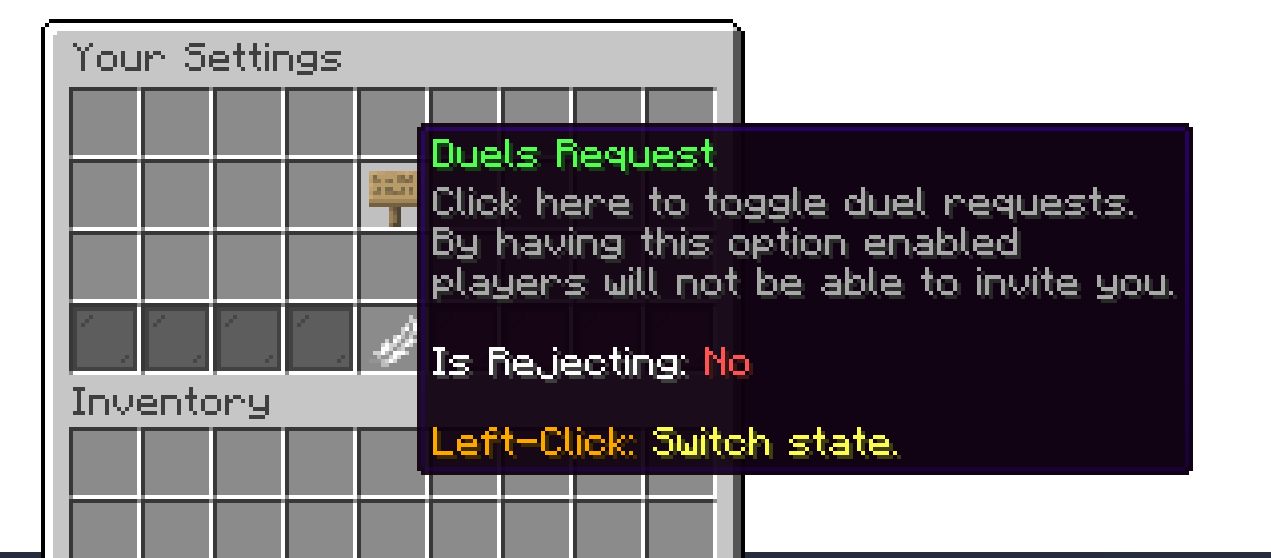
Player Settings
The same toggle is available as a command, /toggleduelrequest, and readable as a placeholder, %phoenixduels_rejecting_duel_requests%.
With Party Requests players can enable or disable party invitations from other users, exactly as above but for parties. It is off by default, meaning invitations come through normally.
Its command is /togglepartyrequest, and its placeholder is %phoenixduels_rejecting_party_requests%.
With Ping Range players choose the highest ping they accept from an opponent. Each click moves to the next step: Unrestricted, 50 ms, 100 ms, 150 ms, 200 ms, and back to Unrestricted. The item lists every step and highlights the one in use.
In Unranked, Ranked and the Any Mode queue, two sides are only matched when every player's ping is within the limit of each player on the other side. A player who finds no opponent in range simply stays in the queue. Duel invitations and challenges ignore the ping range. The choice is saved with the player's other settings.
The same setting is available as a command, /pingrange, which moves to the next step, or /pingrange <ms/unrestricted> to pick one directly. The steps can be changed in the main configuration.
All three options are ordinary menu items and live in menus/settings.yml, so their slot, material, name and lore can all be changed. In the Ping Range lore, the %choices% line is replaced by the list of steps, drawn with the ping-range-choice and ping-range-choice-selected formats. Adding your own items to that menu works like any other menu.
Your guide to the docs
Ask me anything about Phoenix Duels. I know these docs inside out, check the latest versions and changelogs, and can read your server logs.
Try asking
Your cart is empty
Looks like the spiders padded through here. Pick a plugin and it will show up here. Continue shopping