






Your cart is empty
Looks like the spiders padded through here. Pick a plugin and it will show up here. Continue shoppingLobby items for each player state, plus the lobby scoreboard, join actions and player menu.
The Lobby Items add-on adds lobby items to PhoenixDuels. The add-on includes three different stages: default lobby items, party items, and queue items. It also brings a lobby scoreboard, join actions, and a right-click menu on other players. This add-on requires PhoenixDuels Premium.

Lobby Items - Add-On
You can purchase this add-on on Phoenix Store
To install this add-on, simply drag and drop the jar file into the PhoenixDuels/addons folder, then restart your server.
The add-on will generate a file in the main PhoenixDuels folder called lobby.yml , which contains all configuration settings for the add-on.
This add-on supports Folia, which is still experimental.
The lobby includes special items to help users navigate the plugin’s features more easily. By default, the lobby items are:
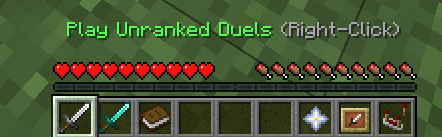
Default Lobby Items
When a user joins a party, their hotbar items automatically change to enhance navigation and make it easier to play games with the party. The items available during the party state are:
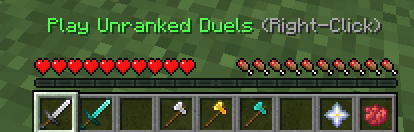
Party Lobby Items
When the party is queuing, the hotbar items automatically update to include a red dye. Clicking on the red dye allows a party member to leave the queue, which will stop the entire party from queuing.
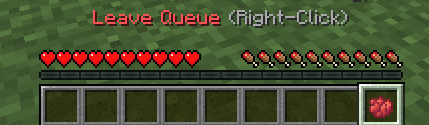
Queue Lobby Items
When the Rematch & Requeue add-on opens a rematch window for a player at the end of a match, a clock is laid over the hotbar for as long as that window lasts and disappears again once it expires. It has its own slot on the default stage and on the party stage; the queue stage has no rematch item, so nothing is overlaid while a player is queueing.
hotbar:
  rematch-item:
    default:
      slot: 4
      material: CLOCK
    party:
      slot: 3
      material: CLOCK
Each stage decides which hotbar slot the player is left holding once the items are handed out. Unlike the item slots above, this one counts from 0 on the left, so 8 is the far right of the hotbar.
hotbar:
  enabled: true
  player-held-slot:
    default: 0
    party: 7
    queue: 8
Turning the hotbar off leaves player inventories untouched. The lobby scoreboard and the join actions keep working.
Hotbar items cannot be dropped, moved around an inventory, swapped into the off hand, or left behind as a death drop. Players in creative mode are exempt from all of that, so an admin can still clear their own hotbar.
Switching between the default, party and queue stages only swaps the lobby items, so everything else a player carries stays, such as items won from a bet or an inventory handed back after a match. The whole inventory is cleared only when a player joins, respawns, or moves into or out of a lobby world.
hotbar:
  clear-inventory: true
Turning it off makes those moments remove only the lobby items too.
A player's own item sitting in a slot a lobby item needs is moved to a free slot, or to Lost Items when the inventory is full.
/pduels lobbyitems <default/party/queue> hands you the items of that stage without having to actually join a party or a queue first. The next event that rebuilds your hotbar, such as joining a party or leaving a match, replaces them again.
To display the player's head in the hotbar, use the following method.
material: PLAYER_HEAD
To display a custom head as an item, use the basehead option.
material: PLAYER_HEAD:BASEHEAD_VALUE
Every time a user joins the server, specific actions can be triggered. By default, the plugin sends a how to duel message.
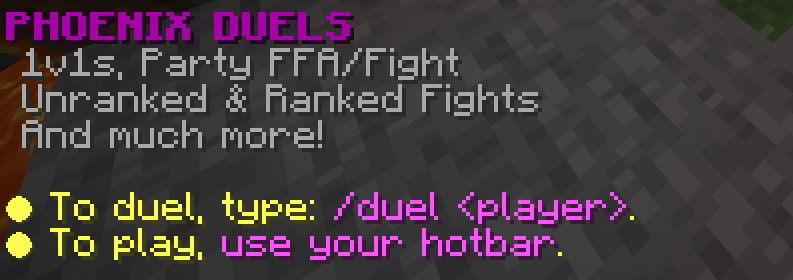
Join Message
lobby:
  every-join-actions:
  - '[MESSAGE] &7'
  - '[MESSAGE] &5&lPHOENIX DUELS'
  - '[MESSAGE] &7 1v1s, Party FFA/Fight'
  - '[MESSAGE] &7 Unranked & Ranked Fights'
  - '[MESSAGE] &7 And much more!'
  - '[MESSAGE] &7'
  - '[MESSAGE] &e⬤ To duel, type: &d/duel <player>&e.'
  - '[MESSAGE] &e⬤ To play, &duse your hotbar&e.'
  - '[MESSAGE] &7'
Your server will now display a lobby scoreboard. Note that this scoreboard only appears in the lobby, during a duel the match’s own scoreboard will take over.
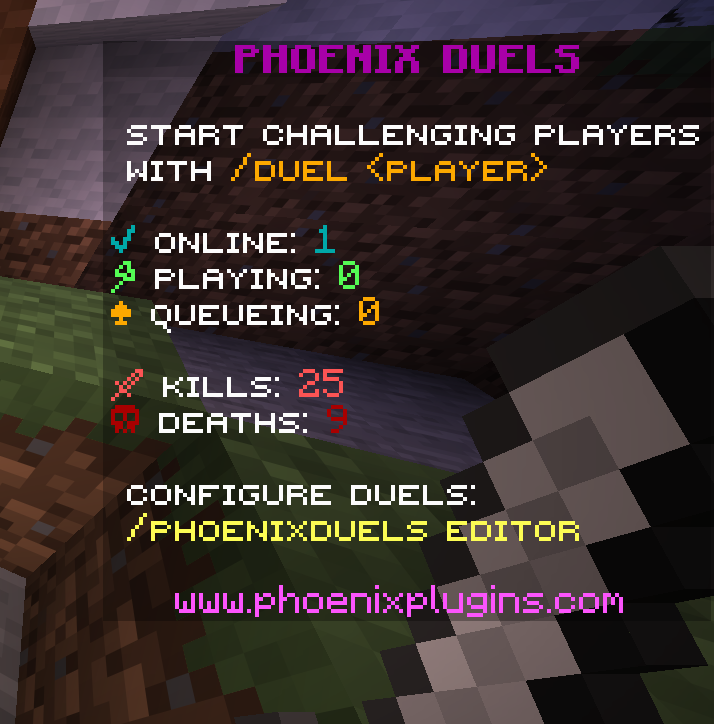
Lobby Scoreboard
scoreboard:
  enabled: true
  refresh-rate: 20
  header:
    interval: 2
    frames:
    - '&5&lPHOENIX DUELS'
    - '&d&lP&5&lHOENIX DUELS'
    - '&d&lPH&5&lOENIX DUELS'
    - '&5&lP&d&lHO&5&lENIX DUELS'
    - '&5&lPH&d&lOE&5&lNIX DUELS'
    - '&5&lPHO&d&lEN&5&lIX DUELS'
    - '&5&lPHOE&d&lNI&5&lX DUELS'
    - '&5&lPHOEN&d&lIX&5&l DUELS'
    - '&5&lPHOENI&d&lX D&5&lUELS'
    - '&5&lPHOENIX &d&lDU&5&lELS'
    - '&5&lPHOENIX D&d&lUE&5&lLS'
    - '&5&lPHOENIX DU&d&lEL&5&lS'
    - '&5&lPHOENIX DUE&d&lLS'
    - '&5&lPHOENIX DUEL&d&lS'
    - '&5&lPHOENIX DUELS'
    - '&5&lPHOENIX DUELS'
    - '&5&lPHOENIX DUELS'
    - '&5&lPHOENIX DUELS'
    - '&5&lPHOENIX DUELS'
    - '&5&lPHOENIX DUELS'
    - '&5&lPHOENIX DUELS'
    - '&5&lPHOENIX DUELS'
    - '&5&lPHOENIX DUELS'
    - '&5&lPHOENIX DUELS'
    - '&5&lPHOENIX DUELS'
    - '&5&lPHOENIX DUELS'
    - '&5&lPHOENIX DUELS'
    - '&d&lPHOENIX DUELS'
    - '&d&lPHOENIX DUELS'
    - '&5&lPHOENIX DUELS'
    - '&5&lPHOENIX DUELS'
    - '&d&lPHOENIX DUELS'
    - '&d&lPHOENIX DUELS'
    - '&5&lPHOENIX DUELS'
    - '&5&lPHOENIX DUELS'
    - '&5&lPHOENIX DUELS'
    - '&5&lPHOENIX DUELS'
    - '&5&lPHOENIX DUELS'
    - '&5&lPHOENIX DUELS'
    - '&5&lPHOENIX DUELS'
    - '&5&lPHOENIX DUELS'
    - '&5&lPHOENIX DUELS'
    - '&5&lPHOENIX DUELS'
    - '&5&lPHOENIX DUELS'
    - '&5&lPHOENIX DUELS'
  lines:
  - ''
  - ' ꜱᴛᴀʀᴛ ᴄʜᴀʟʟᴇɴɢɪɴɢ ᴘʟᴀʏᴇʀꜱ'
  - ' ᴡɪᴛʜ &6/ᴅᴜᴇʟ <ᴘʟᴀʏᴇʀ>'
  - ''
  - '&3✔ &fᴏɴʟɪɴᴇ: &3%online%'
  - '&a🪓 &fᴘʟᴀʏɪɴɢ: &a%playing%'
  - '&6♠ &fǫᴜᴇᴜᴇɪɴɢ: &6%queueing%'
  - ''
  - '&c🗡 &fᴋɪʟʟꜱ: &c%kills%'
  - '&4☠ &fᴅᴇᴀᴛʜꜱ: &4%deaths%'
  - ''
  - ' ᴄᴏɴꜰɪɢᴜʀᴇ ᴅᴜᴇʟꜱ:'
  - ' &e/ᴘʜᴏᴇɴɪxᴅᴜᴇʟꜱ ᴇᴅɪᴛᴏʀ'
  - ''
  - '    &dwww.phoenixplugins.com    '
Beyond every PlaceholderAPI placeholder installed on your server, the lobby scoreboard understands the following on its own.
| Placeholder | Description |
|---|---|
| %player% | The name of the player looking at the board. |
| %online% | The amount of players online. |
| %max_online% | The player slot limit of the server. |
| %playing% | The amount of players currently inside a match. |
| %queueing% | The amount of players currently in a queue. |
| %kills% | The player's kills across challenge, unranked and ranked combined. |
| %deaths% | The player's deaths across challenge, unranked and ranked combined. |
If another plugin claims a player's sidebar, the lobby board steps aside for it and comes back on its own once that claim is released.
Sends every player to the lobby spawn point as they log in. The spawn point is the one set with /pduels setLobby, and nothing happens if none has been set yet. Players who respawn outside a match are always sent there regardless of this option.
teleport-on-join: true
Lets players right-click each other in the lobby to open a small menu offering a duel invitation and a party invitation for that player. It never opens for NPCs, and never while either of the two is in a match.
player-interaction-menu: true
The menu itself, including which items sit in it and what they run, is a normal menu file and can be edited or given extra items like any other. Bedrock players get it as a form, see GeyserMC (Bedrock).
Hotbar items, the scoreboard and the player interaction menu all follow the world list of the main configuration, so a world excluded from PhoenixDuels gets none of them. Walking out of a lobby world clears the hotbar items, and walking back in hands them out again.
With PhoenixLobby 3.3.0 or newer on the same server, PhoenixLobby leaves its own lobby items out of the worlds where this add-on hands out its hotbar. Its Stand Down In Duels Worlds join setting turns that off.
Your guide to the docs
Ask me anything about Phoenix Duels. I know these docs inside out, check the latest versions and changelogs, and can read your server logs.
Try asking
Your cart is empty
Looks like the spiders padded through here. Pick a plugin and it will show up here. Continue shopping