

Oops... looks like the spiders padded through here
Add products to your cart and remove them from here Lets buy




On this page, you will learn more regarding the Sign Queues Add-On.
The Sign Queues add-on allows the admins to create signs that players can use to queue for a game mode. This add-on requires PhoenixDuels Premium.
Sign Queues - Add-on
👉 You can purchase this add-on on Phoenix Store
To install this add-on, simply drag and drop the jar file into the PhoenixDuels/addons folder, then restart your server.
These are the following files that this add-on will generate to your PhoenixDuels folder:
PhoenixDuels\sign_queue.yml - Signs and their format can be found on that file.PhoenixDuels\translations\signqueue.translations.en.yml - The translation file for the add-on.Once you have installed the add-on on your server, you will be able to set up signs for queuing similar to the ones below. The plugin supports any type of sign.
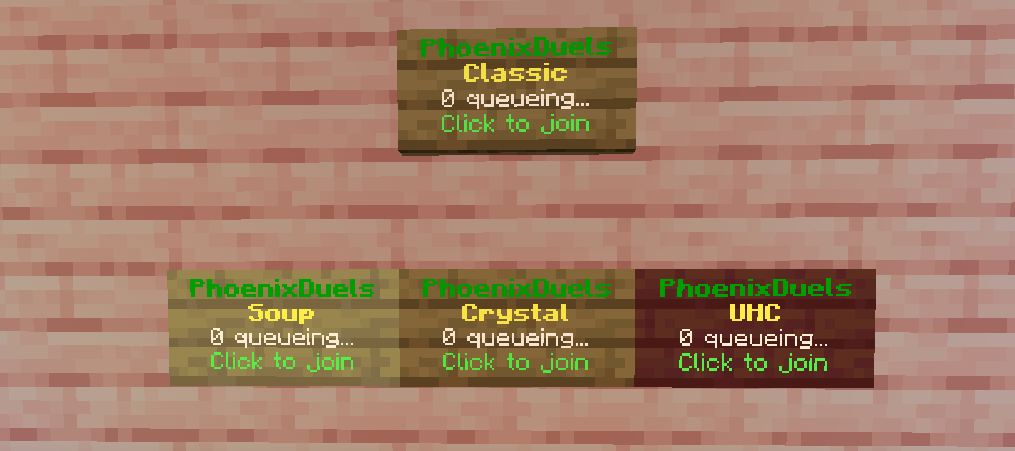
Sign Queues in-game
Once a sign is registered, its four lines are rebuilt from a single template shared by every queue sign, so changing the template restyles all of them at once. The same placeholders described on the next page are available on each line.
lines:
- '&0<&f&lQueue&r&0>'
- '&7&l%mode%'
- '&7%queue% queueing...'
- '&fClick to join'
A sign whose mode no longer exists, usually because the mode was renamed or deleted, falls back to a second template instead, so a broken sign is obvious in-game rather than silently doing nothing.
invalid-lines:
- '&0<&f&lQueue&r&0>'
- '&cInvalid mode'
- ''
- '&e&nContact staff!'
Signs are redrawn whenever somebody joins or leaves the queue they point at, not on a timer, so the counter on a sign is always current without any polling cost.
Oops... looks like the spiders padded through here
Add products to your cart and remove them from here Lets buy