

Oops... looks like the spiders padded through here
Add products to your cart and remove them from here Lets buy




On this page you will find details regarding all the states that the inventories have.
The lobby includes special items to help users navigate the plugin’s features more easily. By default, the lobby items are:
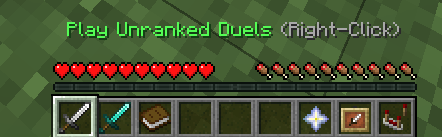
Default Lobby Items
When a user joins a party, their hotbar items automatically change to enhance navigation and make it easier to play games with the party. The items available during the party state are:
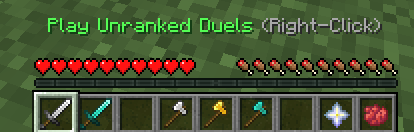
Party Lobby Items
When the party is queuing, the hotbar items automatically update to include a red dye. Clicking on the red dye allows a party member to leave the queue, which will stop the entire party from queuing.
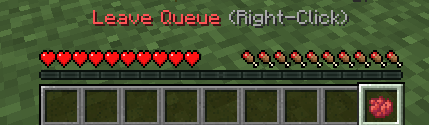
Queue Lobby Items
When the Rematch & Requeue add-on opens a rematch window for a player at the end of a match, a clock is laid over the hotbar for as long as that window lasts and disappears again once it expires. It has its own slot on the default stage and on the party stage; the queue stage has no rematch item, so nothing is overlaid while a player is queueing.
hotbar:
  rematch-item:
    default:
      slot: 4
      material: CLOCK
    party:
      slot: 3
      material: CLOCK
Each stage decides which hotbar slot the player is left holding once the items are handed out. Unlike the item slots above, this one counts from 0 on the left, so 8 is the far right of the hotbar.
hotbar:
  enabled: true
  player-held-slot:
    default: 0
    party: 7
    queue: 8
Turning the hotbar off leaves player inventories untouched. The lobby scoreboard and the join actions keep working.
Hotbar items cannot be dropped, moved around an inventory, swapped into the off hand, or left behind as a death drop. Players in creative mode are exempt from all of that, so an admin can still clear their own hotbar.
/pduels lobbyitems <default/party/queue> hands you the items of that stage without having to actually join a party or a queue first. The next event that rebuilds your hotbar, such as joining a party or leaving a match, replaces them again.
To display the player's head in the hotbar, use the following method.
material: PLAYER_HEAD
To display a custom head as an item, use the basehead option.
material: PLAYER_HEAD:BASEHEAD_VALUE
Oops... looks like the spiders padded through here
Add products to your cart and remove them from here Lets buy