

Oops... looks like the spiders padded through here
Add products to your cart and remove them from here Lets buy




On this page, you will learn how to set up a Queue Sign.
The format to set up the queue sign is as follows.
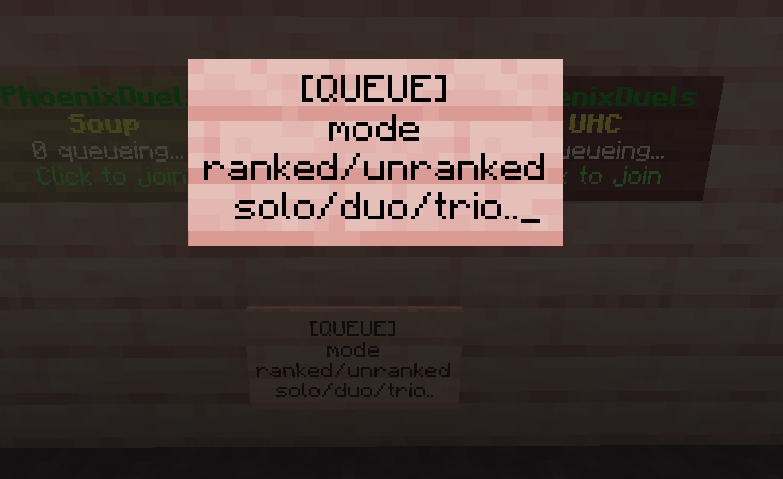
Sign Queue Format
| [QUEUE] |
|---|
| The ID of your gamemode |
| Ranked/Unranked | Solo/Duo/Trio/Quad |
If you want to create a queue sign for players to play 1v1 ranked in Crystal mode, it would look like the following:
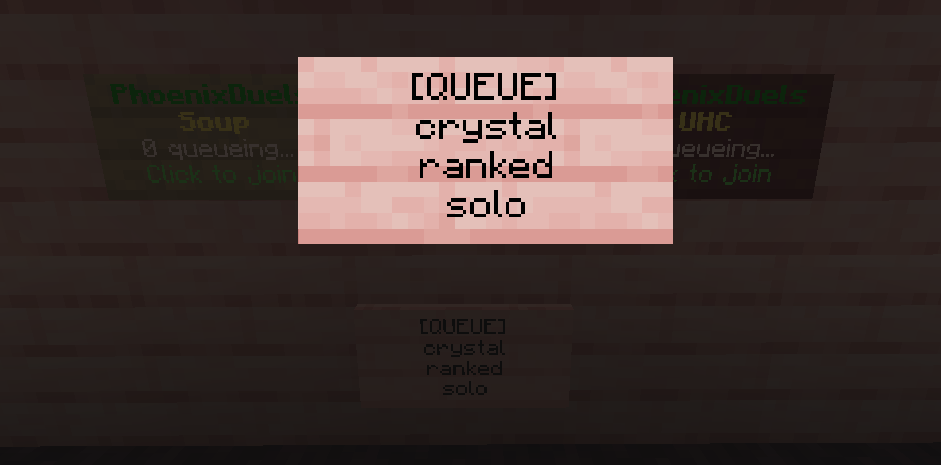
Example for Crystal Ranked 1v1 Sign Queue<
  '1':
    location:
      world: world
      x: 612.0
      y: 102.0
      z: -6.0
      yaw: 0.0
      pitch: 0.0
    mode: crystal
    queue-type: RANKED
    team-size: SOLO
If you want to modify the queue sign at any point, you can either edit it manually in the sign_queue.yml file, as shown in the example above, or Shift + Right-click the sign.
Here is a list of the placeholders that you can use on the signs.
| Placeholder | Description |
|---|---|
| %type% | Returns Ranked, Unranked |
| %team% | Returns Solo, Duo, Trio, Quad |
| %mode% | Returns the gamemode's display name |
| %queue% | Returns the amount of players queuing. |
| %queuesize% | Returns the amount of players that can queue |
Right-clicking a sign puts the player in that queue. Right-clicking it again while already queued for that exact mode, type and team size takes them back out, so a single sign covers both directions and no separate leave item is needed.
Clicking a sign whose mode no longer exists only warns the player; it never queues them for anything.
Breaking the sign removes the registration along with the block. Players without phoenixduels.admin cannot break a queue sign at all, so a registered sign is safe from anyone with build rights in the lobby.
Creating and editing queue signs also requires phoenixduels.admin. Writing the format on a sign without it leaves an ordinary sign behind.
Oops... looks like the spiders padded through here
Add products to your cart and remove them from here Lets buy